Monday, March 28, 2011

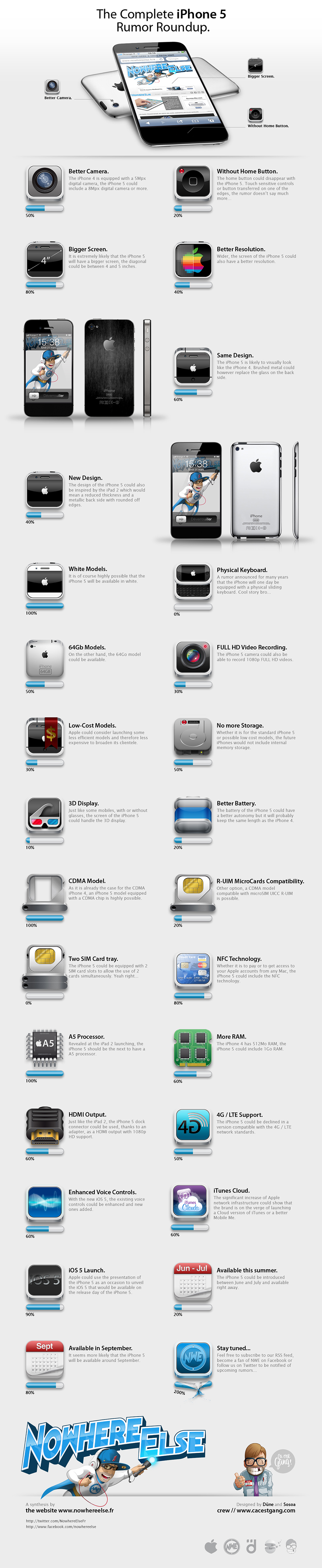
กระแสข่าวลือเกี่ยวกับ iPhone 5 มีออกมาเยอะแยะมากมาย ทางเว็บ Nowhereelse เลยทำภาพ infographics มาให้ดูกันง่าย ๆ ว่า ข่าวลือเกี่ยวกับ iPhone 5 มีอะไรบ้าง แถมยังให้ เปอร์เซ็นต์ด้วยว่า ความเป็นไปได้ที่ iPhone 5 จะเป็นตามข่าวลือ แต่ละตัว มันเยอะน้อยแค่ไหน มาดูกันเลย iPhone 5 จะมีอะไรบ้าง ตามข่าวลือ
ที่มา :
http://www.nowhereelse.fr/iphone-5-43523/
Monday, March 28, 2011 0

หมายเหตุ : Cydia สามารถใช้ได้ต่อเมื่อ jailbreak เครื่องแล้ว เท่านั้น
1. เรียก Cydia ขึ้นมา เชื่อมต่อ Wi-Fi / 3G ให้เรียบร้อย (ไม่แนะนำ ใช้กับ EDGE เพื่อลดการเกิดปัญหาจากเน็ตช้า) ที่หน้าแรก เช็คดูว่า Cydia เวอร์ชันอะไร จากรูปจะเห็นว่าเป็น 1.0.3366-1 เวอร์ชันเก่า ให้กดที่ "Changes" ที่ด้านล่าง


เรียบร้อยแล้ว เราสามารถใช้ Cydia เวอร์ชันใหม่ได้แล้ว ส่วนวิธีการใช้งาน Cydia ก็เหมือนเดิม และอ่านเพิ่มเติมสำหรับ มีอะไรใหม่บ้างใน Cydia 1.1.1

จากที่ AppTube เสนอข่าวไปก่อนหน้านี้ ว่าทาง Saurik หรือ Jay Freeman ได้ประกาศว่าจะมี การออกตัวอัพเดตสำหรับ Cydia เร็วๆ นี้ ล่าสุด Cydia 1.1.1 ได้ออกมาให้ทำการอัพเกรดแล้ว
สำหรับมือใหม่หัดเจลเบรค นั้นอาจจะยังไม่รู้จัก Cydia คืออะไร ?
Cydia คือโปรแกรมสำหรับ iPhone ที่ถูกพัฒนาโดย Jay Freeman (หรือที่รู้จักกันในชื่อ “saurik”) ซึ่งทำให้ผู้ใช้งาน สามารถเข้าไปดาวน์โหลด jailbreak app เพื่อติดตั้งลงใน iPhone , iPad และ iPod Touch ที่ผ่านการ Jailbreak มาแล้ว อาจจะเรียกได้ว่า cydia เป็นตัวกลางเชื่อมโยง เข้าถึงเซิฟเวอร์ ที่มี แอพ ,เกมส์, ธีม, ริงโทน และตัวปรับแต่ง (tweak) เพื่อเพิ่มประสิทธิภาพ ต่างๆ อีกมากมาย ซึ่งเปรียบได้กับ iTunes App Store แบบไม่เป็นทางการนั่นเอง
ใน Cydia Store จะมี jailbreak app ทั้งแบบ ฟรีแอพ และแอพที่ต้องเสียค่าใช้จ่าย รายละเอียดเพิ่มเติม ลองหาอ่านได้ที่ Cydia คืออะไร ? เอาไว้ใช้ทำอะไร ?
มีอะไรใหม่ใน Cydia 1.1.1
- สามารถใช้งาน Activator, libstatusbar, และ SimulatedKeyEvents ขณะ เปิดใช้ Cydia ได้แล้ว
- ปรับปรุงประสิทธิภาพโดยเฉพาะทางด้านความเร็ว ในส่วนของ "Loading Changes"
- ใช้หน่วยความจำน้อยลง
- ใช้วิธีการค้นหาแบบใหม่ ที่เจ๋งกว่าเดิม
- ปัญหาเกี่ยวกับแจ้งเตือน error repository source ที่เสียจนน่ารำคาญเรียบร้อยแล้ว
จากที่ได้ทดลองใช้งานดู ก็พบว่า Cydia ทำงานได้ดีขึ้น ไหลลื่นขึ้นจริง ไม่ต้องรอ reload นานเหมือนแต่ก่อน แต่ก็ไม่ถึงกับขนาดที่ว่า ไม่ต้องรอโหลดเลย แต่ปัญหา แจ้ง error เกี่ยวกับ repo source ที่มีปัญหา แล้ว pop up ข้อความ ไม่มีแล้ว Cydia 1.1.1 สามารถ upgrade ได้เองผ่านทาง Cydia มือใหม่อ่านที่นี่ สำหรับ วิธีการติดตั้ง และ upgrade Cydia 1.1.1
อ่านข้อมูลเพิ่มเติมเกี่ยวกับ Cydia ทั้งหมด
จากข่าวลือที่ปล่อยโดยเว็บ BGR ก็เป็นจริงแล้ว ล่าสุด Apple ได้ออก ตัวอัพเดตใหม่สำหรับ iOS 4.3 เรียบร้อยกับ iOS version 4.3.1 ซึ่งหลัก ๆ ในอัพเดตครั้งนี้คือการแก้ปัญหาต่างๆ เช่น เกิดภาพซ้อนใน iPod Touch 4G, ภาพกระตุกเมื่อใช้ Apple Digital AV Adapter กับโทรทัศน์บางรุ่น และอื่น ๆ ดังนี้
- Fixes an occasional graphics glitch on the iPod touch (4th generation)
- Resolves bugs related to activating and connecting to some cellular networks
- Fixes image flicker when using Apple Digital AV Adapter with some TVs
- Resolves an issue authenticating with some enterprise web services
ดาวน์โหลด iOS 4.3.1 [Direct Link]
- iPhone 4
- iPhone 3GS
- iPad 2 แบ่งเป็น 3 รุ่นดังนี้
- iPad2,1_4.3.1_8G4_Restore.ipsw (WiFi)
- iPad2,2_4.3.1_8G4_Restore.ipsw (GSM)
- iPad2,3_4.3.1_8G4_Restore.ipsw (Verizon CDMA)

Sunday, March 27, 2011

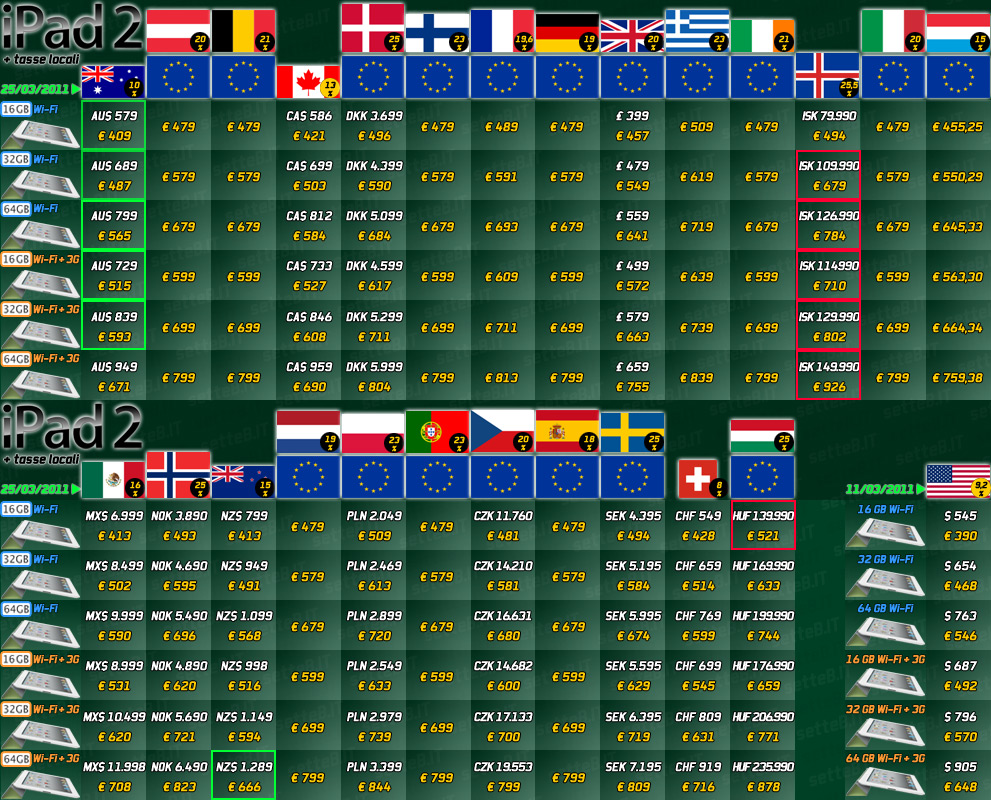
หลัง Apple ประกาศขาย iPad 2 ระยะ 2 พร้อมกัน 25 ประเทศทั่วโลก ประเทศที่ ขายในส่วนใหญ่จะอยู่ใน แถบยุโรป และประเทศในทวีปออสเตรเลีย ทางเว็บอิตาลี Setteb.it ได้ทำ แผนภาพราคาไอแพด 2 ทุกประเทศที่ขายในตอนนี้ โดยราคานั้นจะแปลงเป็น สกุลเงิน ยูโร และมีการรวมภาษี ในแต่ละประเทศให้เรียบร้อยแล้ว ทั้งนี้รวมทั้งราคา iPad 2 ที่อเมริกาด้วย ที่แปลงเป็น สกุลเงินยูโร และคิดค่าภาษี 9.2% ราคานั้นเป็นของ 18 ประเทศที่มีการประกาศราคา อย่างเป็นทางการแล้ว

ส่วนราคา iPad 2 ที่จะขายประเทศไทย ก็คงต้องรอลุ้นช่วงเมษายน ว่าราคา iPad 2 แถวเอเชีย จะเคาะราคาที่เท่าไหร่ จะขายราคามิตรภาพ น่าคบ เหมือน iPad รุ่นแรกหรือเปล่าน้อ.....?
ที่มา :
รูปประกอบ http://www.setteb.it/7b/img_2011/12/12-10815b_tabellaprezziintlipad2big.jpg
Sunday, March 27, 2011 0
Friday, March 25, 2011
AppTube พอดีไปเห็น Thai Apps อีกตัวที่น่าสนใจ เลยเอามาแนะนำเพื่อนๆ กัน ธรรมดาแล้ว เราจะเห็น Thai Applications สำหรับ iPhone ที่เป็น officail app จากทางด้าน บริษัทที่เกี่ยวข้องกับความบันเทิงซะส่วนใหญ่ เช่น Major Cineplex, SF Showtime in Hand หรือ Virgin Radio Thailand แต่ตอนนี้เริ่มมี application สำหรับคนไทย หลากหลายมากขึ้นแล้ว ตัวอย่างที่เห็นได้ชัด ก็คือ ทางเครือ ห้างสรรพสินค้า เซ็นทรัล บุกตลาดออนไลน์ อย่างเต็มตัว ทั้งเปิด Central Shopping Online และ มีการลงทุนพัฒนา Application สำหรับ iPhone อย่าง Central Department Store app อีกด้วย

เมื่อลองเปิด Central iPhone App มาเราก็จะเห็น โลโก้ห้างสรรพสินค้าเซ็นทรัลที่คุ้นเคย ที่หน้าแรก (Home) จะมีข่าวอัพเดตไฮไลท์พิเศษล่าสุด โดย Apps จะแบ่ง เป็นหมวดหมู่ ต่างๆ ให้ดูข้อมูลง่าย ๆ ไม่ยุ่งยาก อย่าง Promotions, New Arrivals, Location และ อื่นๆ
หมวดหมู่ ของ Central iPhone App มีอะไรบ้าง ?

1. Home - หน้าแรกของข่าวสารไฮไลท์พิเศษๆ รวดเร็วทันใจ

2. Promotions - ต่อไปไม่ว่าอยู่ที่ไหน ก่อนไปชอปปิ้ง หรือระหว่างชอปปิ้ง ก็เช็ค ข้อมูลโปรโมชันได้ง่าย ๆ ผ่านไอโฟนได้เลย เรียกว่า คราวนี้รับรองไม่พลาด ส่วนลด พิเศษ หรือการแลกคะแนนสะสม อันนี้เขาใจขาชอปปิ้งเต็มที่ ซึ่งในอนาคตเห็นว่าจะมี e-coupon พิเศษเฉพาะ iPhone apps ด้วยนะ (เห็นไหมหละ มีไอโฟนแล้วคุ้มแค่ไหน)

3. New Arrivals - สำหรับขาชอปปิ้ง ผู้นำเทรนด์ก่อนใคร ต้องมาเช็ค section นี้ กับสินค้าใหม่ ที่เพิ่งส่งตรงมาลงจำหน่ายที่ห้างเซ็นทรัล ตัว Central iPhone apps เขาก็จัดให้ ดูข้อมูลสินค้าใหม่ ไม่ว่าจะเป็น กระเป๋า, รองเท้า, เสื้อผ้า, เครื่องสำอาง ทั้งของคุณผู้หญิง คุณผู้ชาย ก็มาครบ พร้อมทั้ง ช่วยแจ้งให้ทราบด้วยว่า สินค้านี้มีขายที่สาขาไหน

4. Location - แค่มี Central iPhone Apps นี้เวลาเดินทางไป เซ็นทรัลสาขาไหนก็ไม่มีหลงทาง หรือไปไม่ถูก เพราะส่วนนี้ เขาจะบอกข้อมูล แผนที่ เบอร์โทร เวลาเปิดปิดห้าง จัดครบ บอกเบอร์รถเมล ที่ผ่านให้อีกด้วยนะ เหมาะสาขาที่ไม่เคยไป และเหมาะสุด ๆ กับชาวต่างชาติ

5. More - บริการอีกสารพัดอย่างของ ห้างเซ็นทรัล เช่น เข้าไป Shopping online ผ่าน ในตัว Mobile Safari, จองที่นั่งพิเศษ ผ่าน Be Our Guest หรือเช็คงาน event พิเศษ เฉพาะผู้ใช้ iPhone เท่านั้น , และข้อมูลอื่น ๆ
AppTube อยากแนะนำให้โหลด Central Apps นี้มาลองใช้กัน เพราะว่าช่วงนี้ ทางห้างเซ็นทรัล มีให้ลุ้น บัตรชมมายากลของ โลรองต์ บาเรตต้า (Mr.Laurent Beretta) นักมายากลหนุ่มที่โด่งดังมากในยุโรปขณะนี้ แบบที่นั่ง Exclusive Seating : ในวันที่ 1 และ 2 เมษายน 2554 วันละ 10 รางวัล รางวัลละ 2 ที่นั่ง เปิดให้จองผ่านทาง Central iPhone application ที่เดียวตั้งแต่วันนี้ - 28 มีนาคม 2554 (มีไอโฟนก็ดีอย่างนี้แหละนะ ได้สิทธิชิงรางวัลเก๋ ๆ Exclusive ไม่เหมือนใคร) ส่วนใครอยากดูว่ามายากล น่าดูขนาดไหน ดูคลิปได้ที่ท้ายบทความครับ
วิธีการจอง Be Our Guest “The Return of Laurent Beretta Magician Extraordinaire” ก็ทำได้ง่าย ดังนี้
1. เปิด Central iPhone App แล้วเลือกที่หน้านักมายากล

2. คลิกที่ปุ่ม “Be Our Guest”

3. กรอกข้อมูลให้เรียบร้อย

4. ระบบจะแสดงข้อความตอบรับ ก็รอลุ้นผลได้เลย


คลิปเพื่อดูรูปขยาย
จุดเด่น
1. ตัวApps ทำออกมาได้ดีทีเดียว เสถียรดีมาก โหลดผ่าน EDGE ก็ยังไหว อาจจะมี
โหลดภาพสินค้ามาช้าบ้าง แต่ก็ถือว่าทำได้ดี แอพไม่เด้ง ให้เสียอารมณ์
2. มาครบทั้ง 2 ภาษาไทย และอังกฤษ ดังนั้นใครมีเพื่อนต่างชาติ ก็แนะนำให้
เขา โหลด apps นี้มาใช้ได้เลย รับรองได้ข้อมูลครบ
3. ข้อมูลเบื้องต้นสำหรับตัวห้างเซ็นทรัล ถือว่าครอบคลุมดี เอาใจนักชอปเต็มที่
4. แอพดูง่าย สะดวก เมนูเข้าใจง่าย มีภาพประกอบเกือบทุกหน้า
จุดที่อยากให้ปรับปรุง
1. ยังมีแต่ iPhone apps ส่วนของ iPad ยังไม่มี แม้จะเปิดตัว iPad ได้แต่ก็ดูเล็กไปหน่อย
2. ในส่วนของ Location แม้จะมีเบอร์โทรให้ แต่ก็โทรออกจาก ไอโฟนไม่ได้ ถ้า
กดโทรออกได้เลยใน app น่าจะสะดวกมากขึ้น
3. คล้ายๆ ข้อ 2 แม้จะมีแผนที่บอกตำแหน่ง แต่ก็ไม่ได้ link เข้ากับ google maps
ถ้าจะให้เยี่ยมสุด ๆ น่าจะกดให้ google maps นำทางไปยังห้างเซ็นทรัลแต่ละสาขาได้เลย
4. น่าจะมีให้เช็คคะแนนสะสม the 1 card ผ่านในแอพได้ด้วย จะยอดเยี่ยมเลย
สรุปแล้ว เป็นอีกหนึ่ง Free Apps สำหรับคนไทย ที่น่าใช้อีกตัวหนึ่ง ยิ่งใครเป็นแฟนประจำ ห้างเซ็นทรัลนี้อยู่แล้วด้วย ก็ยิ่งไม่ควรพลาด รีบโหลดลงเครื่องอย่างเร็วไว เพราะช่วยอำนวยความ สะดวกให้ได้หลายอย่าง ถือว่าเป็นอีกหนึ่ง apps ที่น่าสนใจที่ทาง ฝั่งห้างสรรพสินค้า เริ่มให้ความสำคัญกับ Mobile Application ต่อไป น่าจะมี Apps หลากหลายแนวมากขึ้นก็ได้ และมีการพัฒนาอย่างต่อเนื่อง ให้ดีขึ้น ๆ ไปอีก

- FREE
- Category: Lifestyle
- Released: 25 February 2011
- 1.0 (iOS 4.0 Tested)
- Size: 2.3 MB
- Language: English
- © 2011 Central Department Store Ltd.
Central Department Store
Requirements: Compatible with iPhone, iPod touch and iPad. Requires iOS 3.1 or later.



Friday, March 25, 2011 0
Thursday, March 24, 2011

ทางเว็บ BGR ที่นำเสนอข่าว เกี่ยวกับกำหนดการออกของ iOS Release ต่างๆ อย่างสม่ำเสมอ ซึ่งส่วนใหญ่ กำหนดเวลาที่ทาง BGR นั้นก็ค่อนข้างแม่นยำพอสมควรเลย ล่าสุดก็ได้ปล่อยข่าวออกมาแล้ววว่า Apple กำลังจะออก iOS 4.3.1 สำหรับ iPad 2, GSM iPhone 4 และ iOS Device อื่น ๆ นอกจากนั้น
BGR ยังแจ้งด้วยว่าใน Release นี้มีอะไรใหม่บ้าง ซึ่งส่วนใหญ่ก็เป็นการ แก้บักซะมากกว่า ซึ่งสำหรับขาเจลเบรค ก็คงต้องลุ้นว่า iOS 4.3.1 นี้ Apple ปิดช่องโหว่ที่ เอาไว้สำหรับ เจลเบรคไปเยอะขนาดไหน
มีอะไรใหม่ใน iOS 4.3.1
- Baseband updates for the 3GS and iPad (original)
- Fixed memory hang that results in memory corruption when reading large files from USIM filesystem
- Fixed problem with NTLM authentication in apps and on websites
- Fixed issue with the Springboard and 3rd party apps not recgonizing the gyroscope on the iPad 2
- Fixed iPad 2 jailbreak vulneratbility
ย้ำอีกที อันนี้เป็นเพียงแค่การคาดการณ์เท่านั้น ส่วนของจริงจะออกเมื่อไหร่ และมีอะไร เปลี่ยนแปลงบ้าง ต้องรอของจริงออกเท่านั้น
Thursday, March 24, 2011 0
Wednesday, March 23, 2011

ล่าสุด Apple ได้ประกาศอย่างเป็นทางการแล้ว สำหรับการจำหน่าย iPad 2 ระยะที่สอง ในอีก 25 ประเทศ โดยก่อนหน้านี้มีข่าวลือว่า อาจจะมีการเลื่อนจำหน่าย เพราะว่า iPad 2 ขายดีมากในอเมริกา ผลิตไม่ทัน แต่สุดท้ายก็เป็นไปตามกำหนดเดิม โดย มีเพียงประเทศเดียวที่เลื่อนคือประเทศญี่ปุ่น เนื่องจากเหตุภัยพิบัติ
การจำหน่าย iPad 2 นั้นก็เหมือนที่ประเทศอเมริกาก็คือ จะจำหน่ายเวลา 5 โมงเย็น วันศุกร์ที่ 25 มีนาคมนี้ สำหรับตามร้าน Apple Store ส่วนออนไลน์สามารถสั่งซื้อได้ตั้งแต่ ตีหนึ่งเป็นต้นไป
25 ประเทศที่จำหน่าย iPad 2 รุ่น WiFi ได้แก่ Australia, Austria, Belgium, Canada, Czech Republic, Denmark, Finland, France, Germany, Greece, Hungary, Iceland, Ireland, Italy, Luxembourg, Mexico, Netherlands, New Zealand, Norway, Poland, Portugal, Spain, Sweden, Switzerland and the U.K
นอกจากนี้ Apple ยังเผยกำหนดระยะที่ 3 จะเป็นของแถบประเทศเอเชีย เช่น ฮ่องกง, เกาหลี, สิงคโปร์ ในช่วงเดือนเมษายน ซึ่งเท่าที่คาดการณ์กันไว้ ประเทศไทยก็น่าจะอยู่ใน Phase 3 นี้แหละ

ส่วนราคาของแต่ละประเทศก็จะเป็นประมาณนี้
UK iPad 2 Pricing
In the UK, iPad 2 is actually cheaper than the original iPad. The WiFi only models of the iPad 2 will go on sale at £399.00 for the 16GB, £479.00 for the 32GB and £559.00 for the 64GB. The premium to go with a 3G derivative will be exactly £100.00.
The original iPad WiFi only cost was £429.00 for the 16GB, £499.00 for the 32GB and £599.00 for the 64GB model, so this represents a nice saving on every model for those in the UK.
Australia iPad 2 Pricing
In Australia, iPad 2 with Wi-Fi will be available for a recommended retail price of A$579 inc GST for the 16GB model, A$689 inc GST for the 32GB model, A$799 inc GST the 64GB model. iPad 2 with Wi-Fi + 3G will be available for a RRP of A$729 inc GST for the 16GB model, A$839 inc GST for the 32GB model and A$949 inc GST for the 64GB model.
Canada iPad 2 Pricing
In Canada prices are $519 (CAN) for the 16GB model, $619 (CAN) for the 32GB model, $719 (CAN) the 64GB model. iPad 2 with Wi-Fi + 3G will be available for a suggested retail price of $649 (CAN) for the 16GB model, $749 (CAN) for the 32GB model and $849 (CAN) for the 64GB model.
France iPad 2 Pricing
France gets a MSRP of € 489 including VAT (€ 400.86 excluding VAT and remuneration for private copying) for the 16GB model, 591 € including VAT (€ 484.15 excluding VAT and remuneration for private copying) for the 32GB model, and 693 € TTC ( € 567.43 excluding VAT and remuneration for private copying) for the 64 GB model. iPad 2 with Wi-Fi + 3G will be available at an MSRP of 609 € including VAT (€ 501.20 excluding VAT and pay for private copy) for the 16GB model, 711 € including VAT (€ 584.48 excluding VAT and remuneration for private copying) for the 32GB model and 813 € including VAT (€ 667.77 excluding VAT and remuneration for private copying) for The 64GB model.
Germany iPad 2 Pricing
In Germany, iPad 2 goes for 479 € including VAT (€ 402.52 excluding VAT) for the 16 GB model, for 579 euros including VAT (€ 486.55 excl VAT) for the 32 GB model, and for € 679 inc VAT (€ 570.59 excluding VAT) for the 64 GB model. iPad 2 with WiFi + 3G for 599 € including VAT (€ 503.36 excluding VAT) for the 16 GB model, for 699 euros including VAT (€ 587.39 excl VAT) for the 32 GB model, and for 799 € including VAT (€ 671.43 excluding VAT) for the 64 GB
Wednesday, March 23, 2011 0
Monday, March 21, 2011

แหล่งข่าวคราวนี้ อ้างว่าหลุดมาจากโรงงานผลิต iPhone ที่ประเทศจีน เลยทีเดียว โรงงาน Foxconn นั่นเอง ซึ่งได้เผยภาพที่น่าเชื่อได้ว่า จะเป็นหน้าตาของ iPhone 5 รุ่นต่อไป ซึ่งก็คล้าย ๆ ข่าวก่อนหน้านี้ หน้าตาของ ไอโฟน 5 ก็คล้ายกับ ไอโฟน 4 นั่นเอง โดยต่างกันที่ ขนาดของหน้าจอ และวัสดุที่ใช้ในการผลิต
iPhone 5 นั้น ตามข่าวลือ ก็จะมีขนาดรูปร่างเท่าเดิม เป็นทรงเหลี่ยม เหมือนเดิม แต่เปลี่ยนจากกระจกที่ใช้เป็นวัสดุใน iPhone 4 ซึ่ง ก็จะกลับมาใช้ โลหะ ในการทำตัวเครื่องแทน แต่วัสดุที่ใช้ ยังไม่มีใครทราบแน่ชัดว่าใช้อะไร เพราะลือกันไปว่าใช้ อะลูมิเนียมเหมือน รุ่นเก่า ๆ แต่สาวก ก็ลุ้นกันว่าจะใช้ Liquid Metal

ส่วนหน้าจอก็ว่ากันว่าจะมีขนาดกว้างขึ้น ในรูปร่างเดิม โดยทาง 9to5Mac ก็เอาภาพ charging cable มาเปรียบเทียบดู ระหว่าง iPhone 5 (GSM) และ iPhone 4 (CDMA) ว่าขนาดทุกอย่างใกล้เคียง กัน ดังนั้น่าจะมีรูปร่างที่ใกล้เคียง iPhone 4 แต่จออาจจะกว้างขึ้น แบบขอบชนขอบ
ดู ๆ ไปแล้ว iPhone 5 อาจจะเป็นเพียงแค่ iPhone 4S ก็ได้ ที่ไม่ได้เปลี่ยน ดีไซน์ แต่เพิ่มประสิทธิภาพแทน แบบ iPhone 3 ไปเป็น iPhone 3GS
Monday, March 21, 2011 1

iOS 4.3 จากทาง Apple ไม่สนับสนุนอุปกรณ์รุ่นเก่า อย่าง iPhone 3G, iPhone 2G, iPod 2G ซึ่งแปลว่าแม้มี ช่องโหว่ทางด้านความปลอดภัยก็ไม่สามารถจะทำอะไรได้ เพราะ Apple ไม่ได้ออกตัวแก้ให้ด้วย และใครใช้อุปกรณ์รุ่นก่อนหน้าแล้ว อยากใช้ iOS ตัวใหม่อย่าง iOS 4.3 ก็สามารถทำได้ แต่เพราะมี คนใจดี "Whited00r" ช่วยทำ custom firmware ให้สำหรับ iPhone 3G, iPhone 2G, iPod 2G
Download Custom firmware iOS 4.3 สำหรับ iPhone 3G, iPhone 2G, iPod 2G
รายละเอียด
Normal or Unlocked?
You should choose Normal release only if you can legitimately activate you device via iTunes AND you don't need carrier unlock (so you are using the original SIM card or your iPhone is factory unclocked). All other users should choose Unlocked firmwares. If you are not sure use Unlocked firmwares. Unclocked firmware need a Push-Notifications patch after the installation. iPhone 3G firmwares only include Activation: you have to install Ultrasn0w via Cydia after installation. Both Normal and Unlocked firmwares includes jailbreak and Cydia.
Full or Lite?
We provide two different Whited00r firmwares based on iOS3. Full edition includes all features (same of them can be added via our Cydia repo too), so if you want a great upgrade use this. Lite editions offer better performances since HomeScreen Wallpapers and Multitasking are not included.
With or Without MMS?
Currenlty v4.3 with MMS enabled is not available for downlaod. Please wait for it.
iPhone 2G users can choose between two kind of firmwares. I suggest using the MMS enabled release only if you really need MMS and Tethering. If you don't use these features I suggest usign the "without MMS" version since it doesn't use a patched CommCenter so you battery could last more.
iOS3 or iOS4 Based?
iOS4 Based firmware has not been released yet. It would require lot of time before it is ready.
iPhone 3G and iPod touch 2G users can choose between iOS3 or iOS4 based firmware. Firmware on iOS3 is really faster then iOS4 based one, but you can't install iOS4+ only apps from AppStore. We reccommend using iOS3 based firmwares since old device runs really slow on iOS4.
Do I need Apple original firmwares?
Indeed you don't need them at all. We provide them in case you would need to restore to Apple official firmware and you can't find these firmware on the web. Remember this too: on iPhone 2G, iPhone 3G, iPod Touch 1G and iPod Touch 2G you don't need saved SHSH (ECID) for downgrade. You always will be free to install all firmwares you want.
How I can extract the firmwares?
You are downloading a .zip that contains a ipsw (this is the real firmware you need to install). Some browsers and operative systems could misunderstand extensions. If you experience problems use Google Chrome browser and unzip the pack with 7zip (on Windows) or TheUnarchiver (on MacOSX). You only need to decompress the .zip and not the .ipsw
How I can install the firmwares?
Read cafully and followe this guide. If you experience problems (like 16xx errors) try this. You can also use the forum to ask for help.